
pibot_cnc_laser_series:v588_ultra:test_pwm:start
2.9 Test PWM Output
Check List · Step 9 of 12 · Measure the GPIO.45 PWM output at 0% / 50% / 100%
🎯 Objective
Test the PWM output on GPIO.45 (the PWM 5V header). You'll set it to a few levels and confirm the voltage and the indicator LED follow along. A multimeter is all you need — no oscilloscope required.
🔌 How it works: PWM means the pin switches between 0 V and 5 V very fast (5 kHz). The duty cycle — how much of each cycle it stays high — sets the average voltage. Your multimeter on DC reads that average: full duty ≈ 5 V, half duty ≈ 2.5 V, off = 0 V.
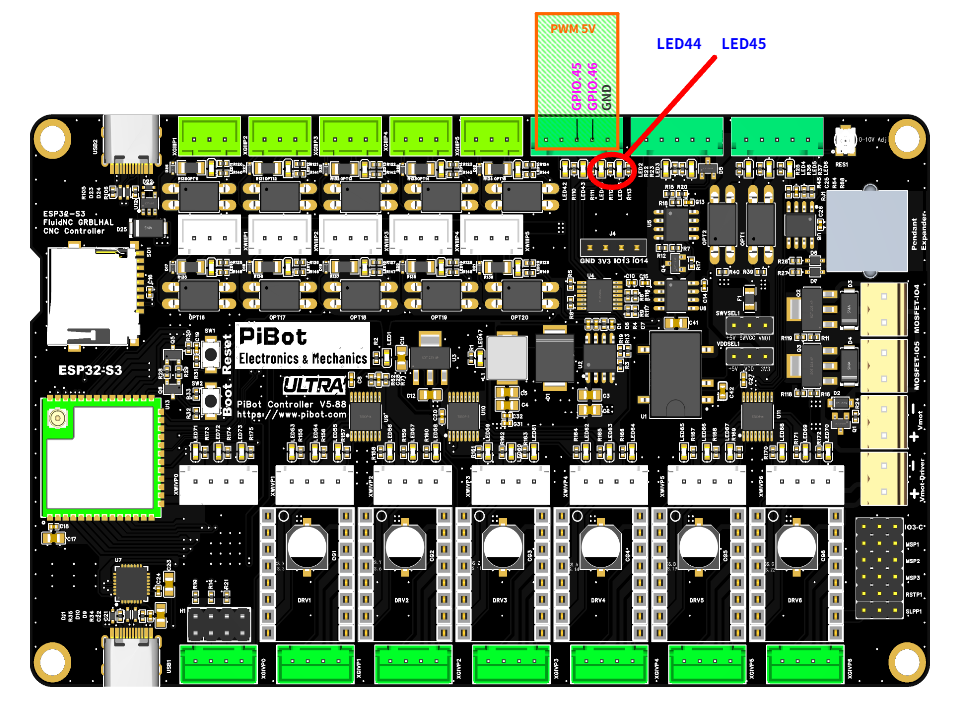
The PWM 5V header — GPIO.45 (PWM), GPIO.46 (Laser), GND — and the output LEDs (red circle): GPIO.45 → LED44, GPIO.46 → LED45. (click to enlarge)
🔧 How to Measure
Set the multimeter to DC voltage, auto-range. On the PWM 5V header:
RED (+) → GPIO.45
BLACK (−) → GND
Red on GPIO.45, black on GND. The meter reads the PWM average — here ≈ 2.5 V at half duty.
First send M6 T0 to select the PWM output, then send each command below. (Leave GPIO.46 alone — that's the laser output, tested in 2.10.)
M6 T0
→
Select the PWM output (tool 0)
M3 S10000
→
5.0 VLED44 full bright
M3 S5000
→
2.5 VLED44 half bright
M5
→
0.0 VLED44 off
✅ Pass: the reading tracks the value — about 5 V at
S10000, 2.5 V at S5000, 0 V after M5 — and LED44 (the GPIO.45 indicator) brightens and dims to match. If it does, the PWM output is good.📈 Optional — what GPIO.45 looks like on an oscilloscope (you don't need one; this is just to show what PWM is):
pibot_cnc_laser_series/v588_ultra/test_pwm/start.txt · Last modified: by admin