
pibot_cnc_laser_series:v588_ultra:test_motor_leds:start
2.6 Test Motor Signal LEDs
Check List · Step 6 of 12 · Verify the XYZABC motor control signal LEDs without connecting motors
⚠️
NOTE: This test only requires observing the onboard LED indicators. No stepper motors, motor power load, or external drivers are required for this verification.
ℹ️
Objective: This step checks whether the six-axis motor control signals are output correctly. You will use the WebUI manual control page to jog each axis and observe the corresponding EN, STP, and DIR LEDs on the controller.
1
Initial Power-up
- Make sure the test
config.yamlhas been loaded. - Power on the controller board.
- Do not connect stepper motors for this test.
- Check the onboard motor signal LED area for all six axes: X, Y, Z, A, B, and C.
- All six EN signal indicator LEDs should illuminate after power-up.
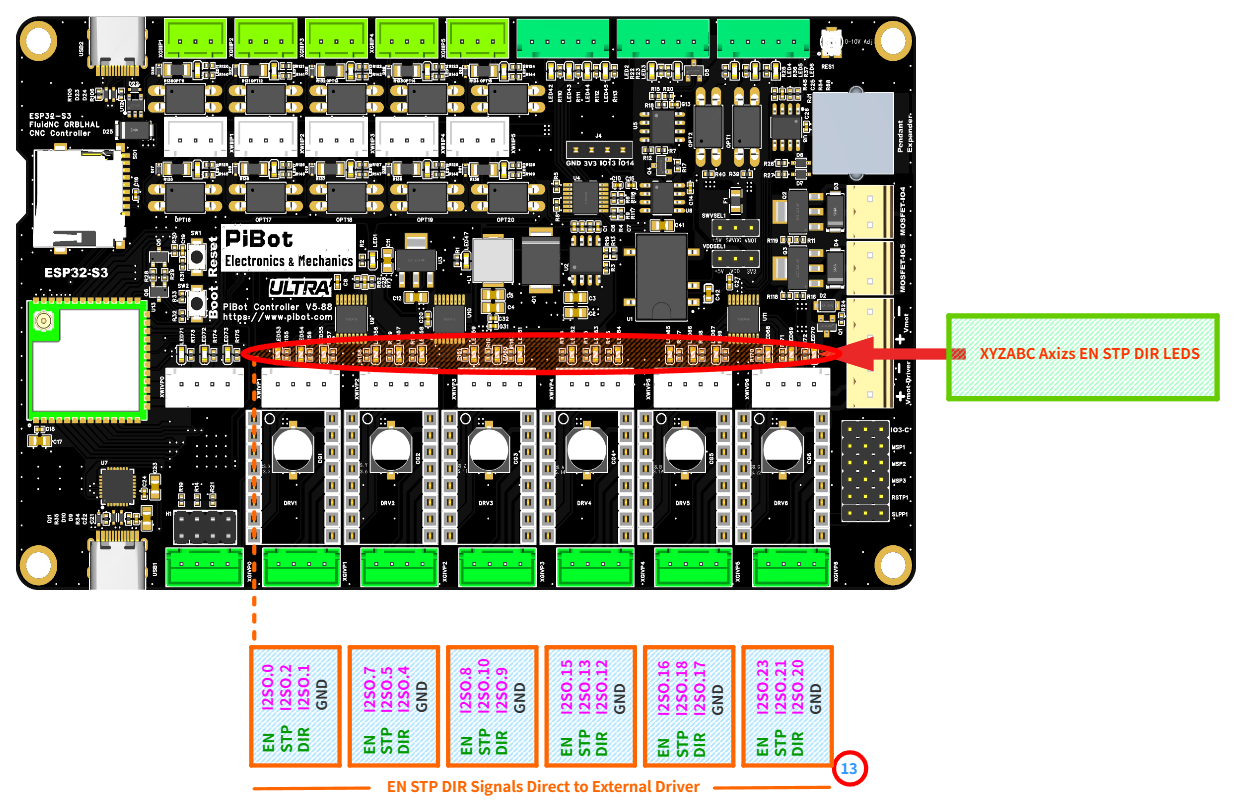
Reference image: 13XYZABC axis EN, STP, and DIR LED indicators. These LEDs are used to verify motor signal output without connecting motors.
| LED | Meaning | What to Check |
|---|---|---|
| EN | Enable signal | Should be ON after power-up when the axis driver output is enabled by the test configuration. |
| STP | Step / pulse signal | Should flash or show activity when the corresponding axis is jogging. |
| DIR | Direction signal | Should change state between forward and reverse jog commands. |
| GND | Signal ground | Ground reference for external driver signal wiring. It is not used as an LED test point. |
2
Open WebUI Manual Control
- Connect to the board Wi-Fi and open the WebUI at 192.168.0.1.
- Open the manual control / jog control page.
- Set a small jog distance and a low feed rate first.
- Use the manual jog buttons to test each axis one by one.
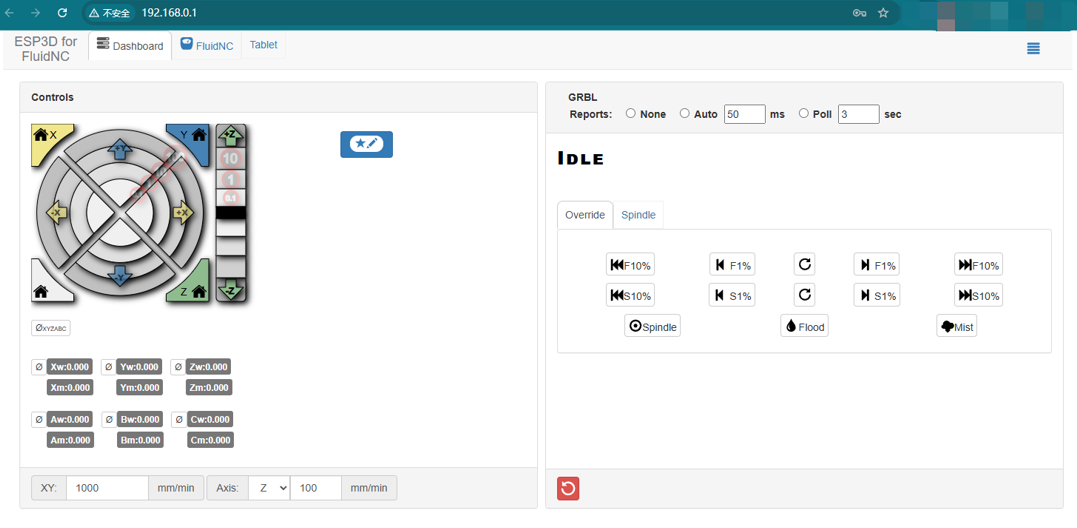
Reference image: WebUI manual control page. Use small jog commands to test each axis signal output.
💡 A small jog distance is enough for this test. Since no motors are connected, you are only checking whether the signal LEDs respond to manual commands.
3
Axis Signal Indicator Testing
- Test axes individually: X, Y, Z, A, B, and C.
- For each axis, jog once in the positive direction and once in the negative direction.
- Observe the corresponding LED group for that axis.
- The STP LED should show activity when the axis is commanded to move.
- The DIR LED should change state when switching between forward and reverse directions.
- The EN LED should remain enabled during the test.
| Test Item | Expected LED Behavior |
|---|---|
| Power on | All six EN LEDs illuminate. |
| Jog axis + direction | The corresponding STP LED shows pulse activity. The DIR LED indicates one direction state. |
| Jog axis - direction | The corresponding STP LED shows pulse activity again. The DIR LED changes to the opposite direction state. |
| Other axes | Only the axis being tested should show signal activity. |
✅
Normal behavior: LED changes indicate that the controller is outputting motor control signals. This confirms the signal side of the axis output circuit before any motor or external driver is connected.
🔧 Quick Troubleshooting
- If no EN LEDs turn on after power-up, confirm that the test
config.yamlis loaded and the board has restarted correctly. - If the WebUI jog buttons do not respond, confirm that the controller status is not in Alarm or Hold state.
- If one axis does not show STP activity, test the same axis again with a larger jog distance, such as 10 mm.
- If the DIR LED does not change, test both positive and negative directions for the same axis.
- If the wrong axis LED group responds, stop testing and re-check the configuration file before connecting any external driver.
✓
Expected Results
- All six axis EN signal indicator LEDs illuminate on power-up.
- Each axis responds to manual forward and reverse jog commands from WebUI.
- The corresponding STP LED shows activity when that axis is jogging.
- The corresponding DIR LED changes state between forward and reverse directions.
- All XYZABC axes demonstrate proper signal output.
- No motor connection is required for this verification.
pibot_cnc_laser_series/v588_ultra/test_motor_leds/start.txt · Last modified: by admin