
pibot_cnc_laser_series:v328_iso:start
PiBot V3.28 Isolated
ATmega328P · GRBL 1.1h · Full Optocoupler Isolation
Isolated for Real Machines
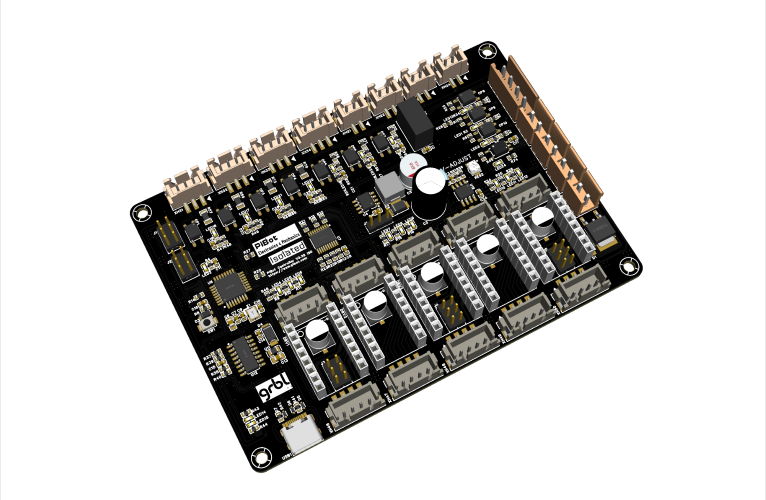
XXYYZ5 Outputs
GRBL 1.1hFirmware
100%Isolated I/O
0–10VSpindle Output
📊 V3.28 Isolated vs. Arduino CNC Shield
The Arduino CNC Shield is common — but it has zero isolation, no 0–10V, and no reverse protection.
Arduino CNC Shield
VS
V3.28 Isolated
✖ No isolation
I/O
✔ B0505S DC-DC + optocoupler
✖ No analog output
0–10V
✔ 0–10V spindle speed output
✖ No reverse protection
SAFE
✔ Anti-reverse polarity design
✖ No LED indicators
LED
✔ Every I/O pin has LED
✖ Onboard A4988 only
DRV
✔ Onboard + external drivers
✖ 3 axes, no dual output
AXES
✔ XXYYZ — dual X & Y
✖ 5V only inputs
INPUT
✔ 24V / 12V industrial switches
✖ Stacks on Uno — wobbly
BUILD
✔ Single board with CH340
✖ Need Arduino IDE to flash
FW
✔ Pre-loaded + WebSerial tool
✖ No optocoupler at all
PWM
✔ Toshiba TLP2395 high-speed opto
📥 Two Firmware Options
Flash either version from your browser — PiBot WebSerial Tool — plug USB, click flash, done.
OFFICIAL
📄 GRBL v1.1h Standard
- Standard GRBL 1.1h features
- Default pin mapping
- Supports Spindle Direction
| Default Pin Mapping | |
|---|---|
| Spindle PWM | D11 |
| Spindle Direction | D13 |
| Coolant Mist (M7) | Disabled by default |
| Coolant Flood (M8) | A3 |
CUSTOM
⭐ GRBL v1.1h Custom
- Customized from GRBL 1.1h
- Optimized pin mapping
- Supports Spindle Enable and Coolant Mist
| Custom Pin Mapping | ||
|---|---|---|
| Spindle PWM | D11 | (unchanged) |
| Spindle Enable | D13 | ← M3/M4 OPEN |
| Coolant Mist (M7) | A4 | ← M7 OPEN |
| Coolant Flood (M8) | A3 | (unchanged) |
⚠ Note: Custom firmware is optimized for V3.28 Isolated hardware. To build it yourself, edit
All outputs active-high. Active-low inputs: X/Y/Z limits, probe, abort, resume, hold. Short signal to GND with a jumper to test.
CH340 Driver: If serial port not listed, install CH340/CH341 driver first.
config.h.All outputs active-high. Active-low inputs: X/Y/Z limits, probe, abort, resume, hold. Short signal to GND with a jumper to test.
CH340 Driver: If serial port not listed, install CH340/CH341 driver first.
🚀 Get Started
Plug in USB. Connect V3.28 to PC. Install CH340 driver if needed (Windows).
Wire drivers. Use onboard driver sockets or connect external drivers (TB6600, DM542, etc.) via Step/Dir/Enable.
Open sender. Candle, UGS, LightBurn, bCNC — any GRBL sender. Baud: 115200.
Configure. Type
$$ to view settings. Set steps/mm, speed, acceleration for your machine.📋 Specifications
| MCU | ATmega328P @ 16 MHz |
| Firmware | GRBL 1.1h (pre-loaded, 2 versions) |
| Motor Outputs | XXYYZ — 5 outputs (X & Y dual, Z single) |
| Driver Support | Onboard sockets + external driver output (5V Step/Dir/Enable) |
| Isolation | B0505S DC-DC isolated 5V + optocouplers on all I/O |
| PWM Isolation | Toshiba TLP2395 (TPL,ES) high-speed optocoupler |
| Spindle | PWM + Enable/Direction + 0–10V analog output |
| Coolant | Flood (M8) + Mist (M7, custom FW) |
| Switch Input | 24V / 12V industrial switch compatible |
| Inputs | X/Y/Z limits, Probe, Abort, Resume, Hold (active-low) |
| LED Indicators | Every I/O pin has LED status indicator |
| Protection | Reverse polarity protection |
| USB | USB-B via CH340 |
| PCB | 2-layer, 2 oz copper, RoHS |
📥 WebSerial Firmware Tool
🛒 PiBot Store
PiBot Electronics · pibot.com · Shipping worldwide since 2013
© PiBot Electronics · pibot.com
pibot_cnc_laser_series/v328_iso/start.txt · Last modified: by admin